Preview — nog niet gelanceerd. Gestippelde vakken zijn nog open (prijs, eisen, licentie).
CNTRLLDSPECTRA

Adaptive spectral shaper

Balance that listens.
A target you draw.

SPECTRA reads your mix as it plays and evens out what doesn’t belong: resonances, build-ups, holes. Where other adaptive tools decide the goal for you, SPECTRA lets you shape it: six nodes on the target curve, and the correction follows.

VST3 · AUmacOS · Apple Silicon0 ms to linear phasemono, L/R or M/S

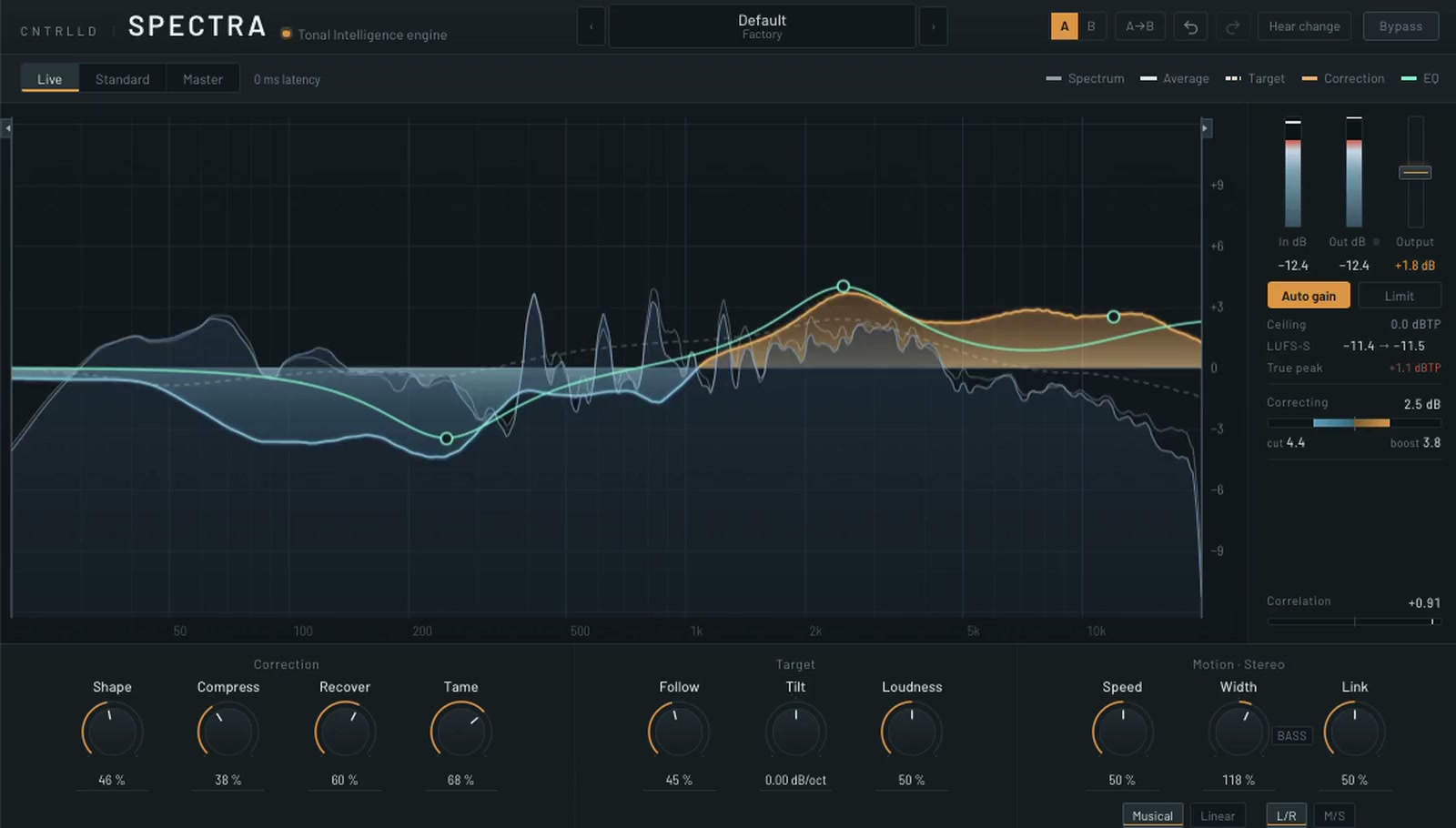
The SPECTRA interface: a spectrum analyser with the correction drawn in amber (boost) and steel blue (cut), a mint EQ line with draggable nodes that shapes the target, meters on the right and three groups of knobs below.

Two ideas, one control

Steer to a reference, or keep your own balance. Or anywhere in between.

There are two schools of automatic tone shaping. SPECTRA does both, and Follow blends between them without steps.

Follow at 0 %

A spectral balancer

Measures the spectrum, compares it to an absolute reference curve and steers the whole tonal balance towards it. Useful when a mix leans too dark, too bright or too heavy.

Follow at 100 %

A perceptual corrector

Leaves your material’s own macro balance alone and only corrects what sticks out of it: resonances, masking build-ups, holes. Useful when the balance is right, but the detail isn’t.

50 %
referenceyour mix

SPECTRA with the mint EQ line lifted around 2.5 kHz and lowered around 240 Hz; the amber and blue correction follows the new target.
The mint line is your part of the target. The amber and blue correction bends to meet it.

The editable target

Not an EQ after the fact. A different destination.

Six draggable nodes form an EQ curve that is added to the target itself. SPECTRA doesn’t colour its output afterwards; it steers towards the shape you drew. So the automatic correction works with your decision instead of fighting it.

  • Drag for frequency and gain, Shift to lock an axis, scroll for Q.
  • Bell, low shelf, high shelf, low cut or high cut per node, from a right-click menu.
  • Aim a node at the stereo signal, at mid only or at side only.
  • Frequency limits at both edges keep the correction out of what you want left alone.
  • Tilt (dB per octave) and Loudness (the ISO 226 equal-loudness contour) move the reference itself.

Correction

A slow hand for tone. A fast one for resonances.

Two paths work towards the same target at different speeds. Two more controls decide how hard each direction pushes.

Shape
tonal balance

Slow and EQ-like. Moves the overall balance towards the target the way you would with a broad equaliser.

Compress
resonances, in time

Fast and dynamic. Catches a resonance the moment it rings, and lets go when it’s gone. Musical or Linear motion.

Recover
lifts dips

How strongly both paths move up. More Recover opens up what is hidden or masked.

Tame
holds peaks

How strongly both paths move down. Works hardest around 3 kHz, where the ear is most sensitive.

The three knob groups: Correction (Shape, Compress, Recover, Tame), Target (Follow, Tilt, Loudness) and Motion · Stereo (Speed, Width with the Bass switch, Link).
Everything that shapes the sound starts at zero. SPECTRA opens doing nothing, and you open it up from there.

Three variants, one curve

From tracking to mastering, without changing what it does.

All three share the same analysis, target and solver. Switching changes how the correction is realised, not what it is. The latency is reported to your DAW, which compensates for it.

Live
0ms
Tracking · live · anything that can’t lag

A minimum-phase filter cascade with no latency at all.

Standard
4ms
Mixing

The same cascade, with the audio held back a few milliseconds so the correction gets a head start.

Master
100ms
Mastering

Fully linear phase: no phase shift at all, with fine low-frequency resolution.

L/R or M/S in every variant: the whole engine can work on mid and side separately. Click-free switching between variants and channel modes, while playing.

SPECTRA in Master and M/S: the mid and the side are analysed and corrected separately; the side is drawn in lavender.
Master in M/S: the side (lavender) gets its own analysis, target and correction.

Motion · Stereo

Width that leaves the mono sum alone.

Width works in the manner of a classic analogue stereo processor: only the side signal is filtered, opening the sides above a few hundred hertz. No saturation, no harmonics added.

  • Mid untouched, bit for bit, and the mono sum mathematically unchanged at any setting.
  • Bass switch: broad bells of +2 dB at 45 Hz and +1.5 dB at 15 kHz, after the correction.
  • Speed sets how quickly a correction engages; Link how much both channels share one curve.
The Motion · Stereo group: Speed, Width with the Bass switch, Link, and the Musical/Linear and L/R–M/S switches.

Engineering

It renders the way it plays.

An adaptive processor makes decisions all the time. SPECTRA makes them the same way, every time, whatever your DAW asks of it.

1–2048samples
Identical at any buffer size

Output tested bit for bit across buffer sizes. A bounce sounds exactly like playback.

−97dB
Quiet motion

A moving correction leaves almost nothing behind, measured against the music.

44.1–192kHz
Every common rate

Every DSP check runs at six sample rates.

~1000
Automated checks

DSP checks, interface self-tests and plug-in validation at its strictest level.

Breaks left alone

A build-up that drops the bass isn’t read as a thin mix. The empty low end isn’t filled, so the drop doesn’t land louder than the rest.

Auto gain

Hear the change in tone, not in level. The makeup is shown in dB, never hidden.

Hear change

Listen to only what SPECTRA takes away or adds. With nothing engaged, it’s silence.

True-peak limiter

Optional, on the output, with a ceiling from −6 to 0 dBTP. Adds latency only while it’s on.

Metering

Level in and out with peak holds, short-term loudness, true peak, correlation, and how much is being corrected.

No clicks

Variants, L/R and M/S, bypass, limiter and Bass all switch with a crossfade. Bypass keeps the latency.

Interface

See what it does, as it does it.

The analyser draws the correction as it is actually realised: amber where SPECTRA boosts, steel blue where it cuts. Rest on a knob and a short card explains it.

SPECTRA at work in Live: two narrow resonances are cut in steel blue while the low end and top are gently lifted in amber.
Two resonances caught and cut, while the balance around them is gently lifted.
Explanation card for Follow.
Explanation cards on hover.
Meters: loudness in and out, output gain, auto gain and limiter, ceiling with gain reduction, LUFS-I, true peak, correction amount, correlation.
Meters, auto gain and limiter.
  • Presets and A/B with copy between slots
  • Undo / redo for every move
  • Type any value, e.g. 1.5k
  • Resizable window that keeps its shape

Specs

System requirements

Details can still change before release.

FormatsVST3 and AUWindows (VST3) is on the way
macOSmacOS 11 or later, Apple SiliconIntel support is planned for release
Sample rates44.1 to 192 kHz
LatencyLive 0 ms · Standard 4 ms · Master 100 ms+1.35 ms with the limiter on. Reported to the host.
ChannelsMono and stereoIn stereo, as L/R or M/S. On a mono track Width, Link and M/S simply have nothing to work on.
Tested hostsReaper and Logic ProValidated with pluginval at its strictest level and with Apple’s auval on every build.
CPUAbout 7 % of one core at 48 kHzMeasured on an M2 Pro with everything turned up; 96 kHz roughly doubles it.
LicenceA signed licence with your name on itWorks on up to three of your own computers. No activation server, no iLok, no dongle.
Trial30 days, nothing held back

Windows is on the way

SPECTRA is macOS only today — VST3 and AU, Apple Silicon. The Windows version (VST3) is being built. Leave your address and we'll write to you the day it's out.

One e-mail, about the Windows release. Nothing else, and you can stop it with one click. We ask you to confirm by e-mail first.

Try or buy

Hear it on your own mixes first.

Download the full version and use it on your own material for 30 days. Buy it when you are convinced: the trial and the paid plug-in are the same download, and your licence simply switches the clock off.

SPECTRA is in beta while version 1 is being finished, and it is on sale at the introductory price for that reason. Buy today and you get the build that is out now plus every update up to and including the release — there is nothing more to pay at version 1.

CNTRLLDSPECTRA
€99one-time

€149 — introductory price while SPECTRA is being finished. It goes to €149 when version 1 lands. Incl. VAT.

Beta — current build , release included

  • VST3 + AU for macOS
  • Yours to use on up to three of your own computers
  • All three variants, L/R and M/S
  • Every update through version 1, the release included
  • Fully working 30-day trial, no noise bursts

Prices include VAT where applicable. Refund policy

Questions

Frequently asked

Is SPECTRA an EQ?

Partly. It measures the spectrum continuously and applies a correction that changes over time, towards a target. The EQ nodes you draw don’t filter the output directly; they change that target. So it’s closer to an automatic engineer with a brief than to a static EQ.

Which variant should I use?

Live for recording and anything monitored in real time, Standard for mixing, Master for mastering when you want no phase shift at all. They steer towards the same curve, so you can set up in Live and switch to Master for the bounce.

Will my bounce sound like playback?

Yes. The output is identical at every buffer size, so an offline render at a different block size gives the same result as what you heard.

Does it work on mid and side?

Every variant can run the whole engine on mid and side separately. The side’s correction fades out when the side is nearly empty, so it won’t boost noise.

What copy protection does it use?

The friendly kind. Your licence is a short piece of text with your name and e-mail in it, signed by us. SPECTRA checks it on your own machine: no activation server to call, no iLok, no dongle, and the same licence works on up to three computers you use yourself.

What if it doesn't work on my system?

Try the 30-day trial first — that is exactly what it is for. If you bought SPECTRA and it will not run properly on your machine, write to us within 14 days; we will try to fix it, and refund you if we cannot. See the refund policy.

Is there a trial?

Yes: the full plug-in for 30 days, with nothing held back — no noise bursts, no disabled controls. After that it stops passing audio until you activate it.